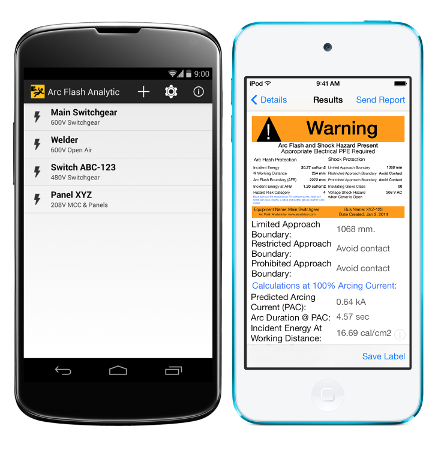
Question: How do you manage the arc flash data collection & label installation process for a 2500+ location project?
This is the question I have been getting for the past few weeks from companies all over the country. When you look at the process of collecting data to conduct an arc flash/coordination study on a scope that encompasses more than 500,000 data points and labels at more than 2,500 locations, Paper and Pen just will not cut it. You will need a standardized uniformed data collection tool.
Answer: FlashTrack by [url='http://facilityresults.com/W1/flashtrack-interface/']www.FacilityResults.com[/url]
[url='http://facilityresults.com/W1/flashtrack-interface/']FlashTrack[/url] is an award winning software (ISHN Reader Choice 2013) that was made for the purpose of collection the required equipment attributes that are needed to conduct and arc flash analysis and coordination study. [url='http://facilityresults.com/W1/flashtrack-interface/']FlashTrack[/url] allows the data collector to model the equipment relationships as you catalog the attributes in the format of a single-line diagram. [url='http://facilityresults.com/W1/flashtrack-interface/']FlashTrack[/url] exports out in the an Excel file or CSV file and produces a “Label Installation Report” that can have up to 4 photographs and the location of each item that will require a label to be installed. [url='http://facilityresults.com/W1/flashtrack-interface/']FlashTrack[/url] runs on Windows Vista, 7 or 8 and works great with the Microsoft Surface Pro.
[ATTACH=full]312[/b][/font][/color][/b][/font][/color][/b][/font][/color][/b][/font][/color][/b][/font][/color][/b][/font][/color][/b][/font][/color]
[color=#ff0000][font=Calibri][b][color=#ff0000][font=Calibri][b][color=#ff0000][font=Calibri][b][color=#ff0000][font=Calibri][b][color=#ff0000][font=Calibri][b][color=#ff0000][font=Calibri][b][color=#ff0000][b][font=Calibri][ATTACH=full]312[/ATTACH]
Attachment:
SKM screenshot TCC.png [ 320.4 KiB | Viewed 2160 times ]
[color=#ff0000][font=Calibri][b][color=#ff0000][font=Calibri][b][color=#ff0000][font=Calibri][b][color=#ff0000][font=Calibri][b][color=#ff0000][font=Calibri][b][color=#ff0000][font=Calibri][b][color=#1f497d][font=Calibri][url='[url][url][url][url][url][url][url]http://facilityresults.com/W1/flashtrack-interface/'][color=blue]http://facilityresults.com/W1/flashtrack-interface/[/url][/color][/url][/font][/color][/url][/b][/font][/color][/url][/b][/font][/color][/b][/font][/color][/url][/b][/font][/color][/url][/b][/font][/color][/url][/b][/font][/color][/url]
[color=#ff0000][font=Calibri][b][color=#ff0000][font=Calibri][b][color=#ff0000][font=Calibri][b][color=#ff0000][font=Calibri][b][color=#ff0000][font=Calibri][b][color=#ff0000][font=Calibri][b][color=#ff0000][b][font=Calibri]Get your free demo at;[/b][/font][/color][/b][/font][/color][/b][/font][/color][/b][/font][/color][/b][/font][/color][/b][/font][/color][/b][/font][/color]
[color=#ff0000][font=Calibri][b][color=#ff0000][font=Calibri][b][color=#ff0000][font=Calibri][b][color=#ff0000][font=Calibri][b][color=#ff0000][font=Calibri][b][color=#ff0000][font=Calibri][b][url='[url][url][url][url][url][url][url]http://facilityresults.com/W1/flashtrack-download-form/'][color=blue][font=Calibri]http://facilityresults.com/W1/flashtrack-download-form/[/url][/url][/font][/color][/url][/b][/font][/color][/url][/b][/font][/color][/b][/font][/color][/url][/b][/font][/color][/url][/b][/font][/color][/url][/b][/font][/color][/url]
[color=#ff0000][font=Calibri][b][color=#ff0000][font=Calibri][b][color=#ff0000][font=Calibri][b][color=#ff0000][font=Calibri][b][color=#ff0000][font=Calibri][b][color=#ff0000][font=Calibri][b]FacilityResults.com[/ATTACH][/ATTACH][/b][/font][/color][/ATTACH][/b][/font][/color][/ATTACH][/b][/font][/color][/ATTACH][/b][/font][/color][/ATTACH][/b][/font][/color][/ATTACH][/b][/font][/color][/ATTACH][/b][/font][/color][/ATTACH][/b][/font][/color][/ATTACH][/b][/font][/color][/ATTACH][/b][/font][/color][/ATTACH][/b][/font][/color][/ATTACH][/b][/font][/color][/ATTACH][/b][/font][/color]